Przeznaczenie i lokalizacja
Aktualizuj core PBX, FreeSWITCH i dodatki za pomocą podpisanych, zgodnych wydań.
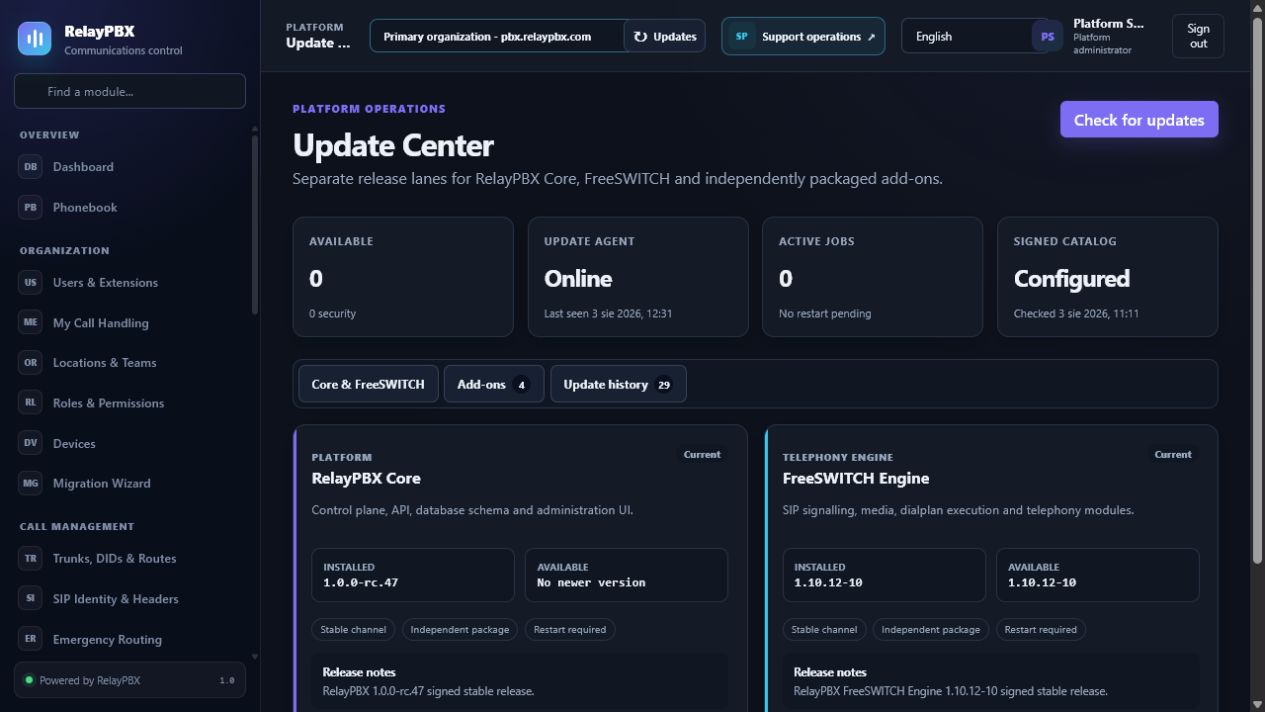
Otwórz Platforma → Centrum aktualizacji. Dostępne elementy sterujące zależą od aktywnej edycji, uprawnień modułu, roli i zakresu tenanta.
Zanim zaczniesz
Zmiany platformowe mogą wpłynąć na wszystkie tenanty. Potwierdź aktualną zweryfikowaną kopię zapasową, właściciela operacji i okno serwisowe, jeżeli działanie może zrestartować usługi lub zmienić uprawnienia licencji.
Przed zmianą masową albo zmianą routingu zapisz bieżącą wartość lub wyeksportuj objęte nią rekordy. Zapewnia to dokładny punkt porównania i ułatwia ocenę obsługiwanego cofnięcia transakcji.
Proces krok po kroku
Wykonuj kroki po kolei. Nie łącz pierwszej konfiguracji z niezwiązanym porządkowaniem danych; małe i jednoznaczne zmiany łatwiej sprawdzić i wycofać.
- Odśwież i sprawdź podpisany katalog z downloads.relaypbx.com.
- Osobno przejrzyj zgodność i wpływ restartu dla Core, FreeSWITCH i dodatków.
- Utwórz i zweryfikuj świeżą kopię zapasową.
- Zastosuj w oknie serwisowym, obserwuj zadanie i wykonaj rozmowy po aktualizacji.
- Użyj zapisanego punktu rollbacku, jeżeli obowiązkowy test akceptacyjny się nie powiedzie.
Opis pól
Korzystaj z poniższego opisu podczas wypełniania formularza. Pola ukryte przez edycję, licencję modułu albo rolę są celowo niedostępne dla zalogowanego użytkownika.
- Komponent
- RelayPBX Core, silnik FreeSWITCH albo pojedynczy dodatek.
- Zainstalowana / dostępna
- Bieżąca niezmienna wersja pakietu i najnowsze zgodne podpisane wydanie.
- Kanał
- Stable albo zatwierdzony strumień wydań.
- Podpisany katalog
- Zaufany manifest i skróty pakietów sprawdzane przed uruchomieniem zadania.
- Zgodność
- Wymagane wersje core i zależności.
- Wpływ restartu
- Usługi albo ruch rozmów objęty zmianą.
- Historia aktualizacji
- Audytowany stan, czas i bezpieczny opis błędu każdego zadania.
- Rollback
- Obsługiwany poprzedni obraz/pakiet i zweryfikowany punkt odtworzenia.
Testy akceptacyjne
Zapisanie rekordu jest dopiero początkiem weryfikacji. Wykonaj wszystkie odpowiednie testy poniżej, a przy telefonii zachowaj identyfikator sesji, czas i wynik rozmowy.
- Potwierdź odrzucenie niepodpisanego, zmienionego albo niezgodnego pakietu przed instalacją.
- Po aktualizacji sprawdź rejestrację, rozmowy, RTP, DTMF i zdalne BYE.
- Wykonaj próbę release candidate potwierdzającą backup i rollback na środowisku testowym albo zatwierdzonym pustym hoście produkcyjnym.
Typowe błędy i bezpieczne odzyskiwanie
Jeżeli test się nie powiedzie, nie dodawaj kolejnych zmian. Przywróć poprzednią wartość albo użyj obsługiwanego cofnięcia transakcji, wygeneruj ponownie konfigurację PBX, a następnie powtórz najmniejszy nieudany test.
- Nie pomijaj podpisu ani kontroli zgodności w celu wymuszenia wydania.
- Aktualizacja FreeSWITCH może przerwać aktywne rozmowy; opróżnij ruch, jeżeli wydanie wymaga restartu telefonii.
Co dołączyć do zgłoszenia
Podaj tenant, moduł i nazwę obiektu, czas lokalny wraz ze strefą, wynik oczekiwany, wynik obserwowany oraz ostatni poprawny stan. Dla problemu z rozmową dołącz identyfikator logicznej sesji i zanonimizowaną diagnostykę tekstową SIP/SDP przed poproszeniem o PCAP.
Nigdy nie wklejaj do zgłoszenia haseł, kluczy prywatnych, nieprzetworzonego dokumentu licencji ani niezanonimizowanych mediów klienta. Gdy pomoc techniczna potrzebuje dodatkowych danych, użyj jednorazowej zgody diagnostycznej i chronionych załączników.