Przeznaczenie i lokalizacja
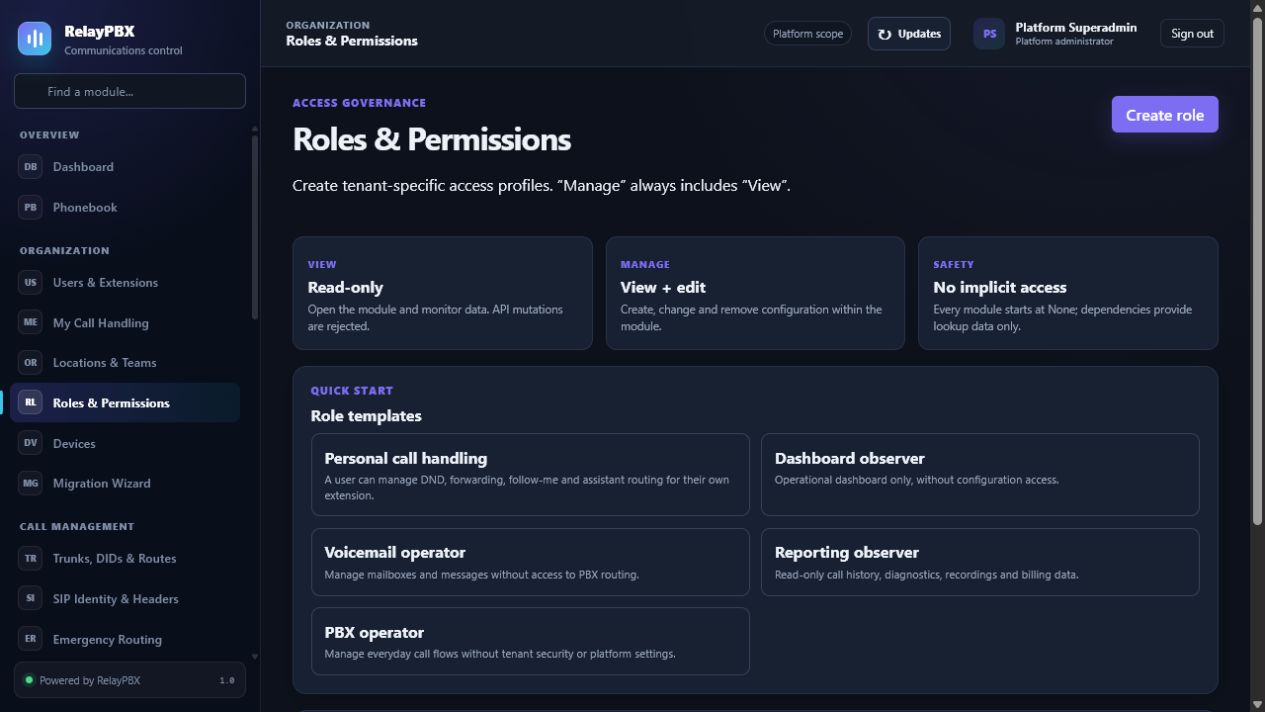
Twórz role o minimalnych uprawnieniach z osobnym dostępem do podglądu i zarządzania modułami.
Otwórz Organizacja → Role i uprawnienia. Dostępne elementy sterujące zależą od aktywnej edycji, uprawnień modułu, roli i zakresu tenanta.
Zanim zaczniesz
Użyj administratora ograniczonego do tenanta, chyba że zadanie rzeczywiście wymaga dostępu do platformy. Utwórz plany, lokalizacje i role przed przypisaniem ich użytkownikom lub endpointom.
Przed zmianą masową albo zmianą routingu zapisz bieżącą wartość lub wyeksportuj objęte nią rekordy. Zapewnia to dokładny punkt porównania i ułatwia ocenę obsługiwanego cofnięcia transakcji.
Proces krok po kroku
Wykonuj kroki po kolei. Nie łącz pierwszej konfiguracji z niezwiązanym porządkowaniem danych; małe i jednoznaczne zmiany łatwiej sprawdzić i wycofać.
- Zacznij od najbardziej zbliżonej roli wbudowanej.
- Najpierw nadaj Podgląd, a dopiero potem Zarządzanie.
- Sprawdź rolę na użytkowniku nieprodukcyjnym.
- Ogranicz operacje platformowe i bezpieczeństwa.
Opis pól
Korzystaj z poniższego opisu podczas wypełniania formularza. Pola ukryte przez edycję, licencję modułu albo rolę są celowo niedostępne dla zalogowanego użytkownika.
- Nazwa roli
- Etykieta roli widoczna dla klienta.
- Podgląd
- Dostęp tylko do odczytu modułu.
- Zarządzanie
- Tworzenie, edycja i usuwanie tam, gdzie jest obsługiwane.
- Zakres
- Granica tenanta albo lokalizacji zastosowana do przypisania.
Testy akceptacyjne
Zapisanie rekordu jest dopiero początkiem weryfikacji. Wykonaj wszystkie odpowiednie testy poniżej, a przy telefonii zachowaj identyfikator sesji, czas i wynik rozmowy.
- Przypisz rolę użytkownikowi testowemu i sprawdź strony dozwolone oraz zabronione.
- Potwierdź, że akcje zarządzania są ukryte, gdy nadano tylko Podgląd.
- Sprawdź granice tenanta i lokalizacji na rekordach z dwóch różnych zakresów.
Typowe błędy i bezpieczne odzyskiwanie
Jeżeli test się nie powiedzie, nie dodawaj kolejnych zmian. Przywróć poprzednią wartość albo użyj obsługiwanego cofnięcia transakcji, wygeneruj ponownie konfigurację PBX, a następnie powtórz najmniejszy nieudany test.
- Nie testuj nowej roli na jedynym koncie właściciela platformy.
- Uprawnienia chronią interfejs i API; samo ukrycie pozycji menu nie jest granicą autoryzacji.
Co dołączyć do zgłoszenia
Podaj tenant, moduł i nazwę obiektu, czas lokalny wraz ze strefą, wynik oczekiwany, wynik obserwowany oraz ostatni poprawny stan. Dla problemu z rozmową dołącz identyfikator logicznej sesji i zanonimizowaną diagnostykę tekstową SIP/SDP przed poproszeniem o PCAP.
Nigdy nie wklejaj do zgłoszenia haseł, kluczy prywatnych, nieprzetworzonego dokumentu licencji ani niezanonimizowanych mediów klienta. Gdy pomoc techniczna potrzebuje dodatkowych danych, użyj jednorazowej zgody diagnostycznej i chronionych załączników.