Przeznaczenie i lokalizacja
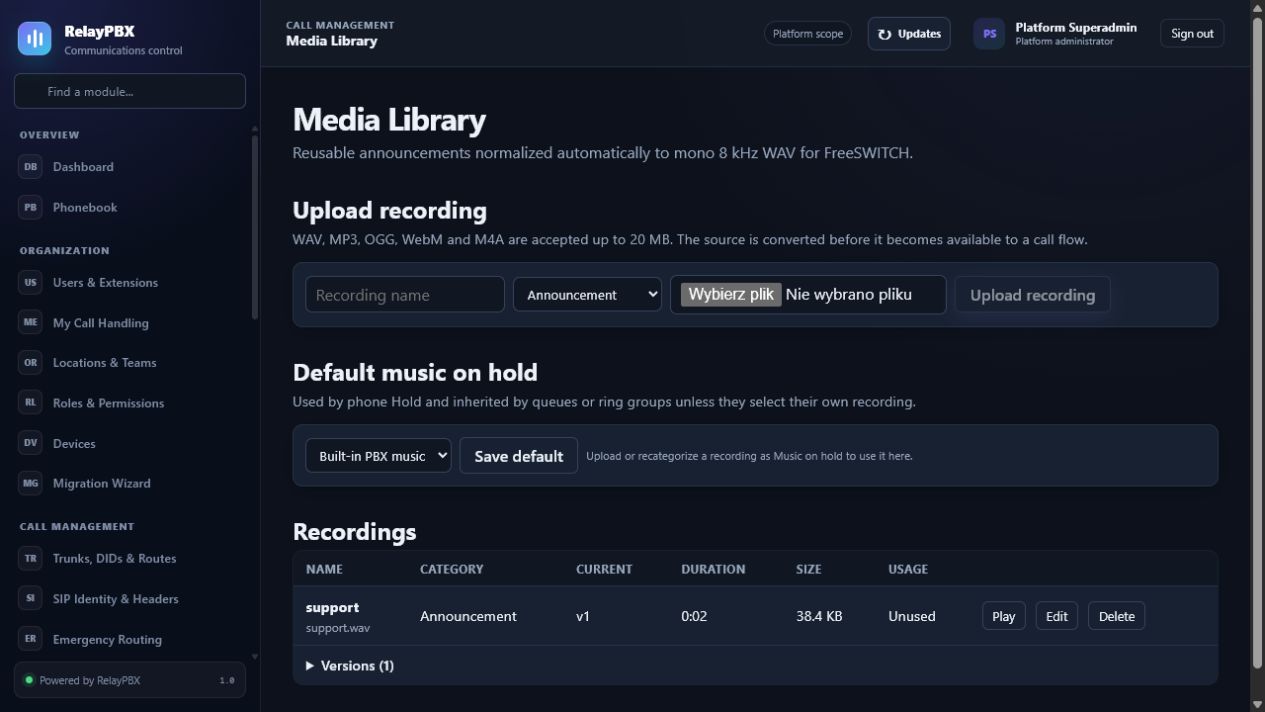
Przesyłaj i przygotowuj zapowiedzi, komunikaty oraz źródła muzyki na oczekiwaniu.
Otwórz Zarządzanie połączeniami → Biblioteka mediów. Dostępne elementy sterujące zależą od aktywnej edycji, uprawnień modułu, roli i zakresu tenanta.
Zanim zaczniesz
Przed edycją zapisz obecną ścieżkę źródłową i docelową. Przygotuj zarejestrowany testowy numer wewnętrzny, cel wycofania oraz ekran Rozmowy i raporty do weryfikacji.
Przed zmianą masową albo zmianą routingu zapisz bieżącą wartość lub wyeksportuj objęte nią rekordy. Zapewnia to dokładny punkt porównania i ułatwia ocenę obsługiwanego cofnięcia transakcji.
Proces krok po kroku
Wykonuj kroki po kolei. Nie łącz pierwszej konfiguracji z niezwiązanym porządkowaniem danych; małe i jednoznaczne zmiany łatwiej sprawdzić i wycofać.
- Prześlij audio, do którego masz prawa.
- Odsłuchaj i znormalizuj je dla telefonii.
- Przypisz jasne zastosowanie i język.
- Przed zastąpieniem używanego pliku sprawdź zależności.
Opis pól
Korzystaj z poniższego opisu podczas wypełniania formularza. Pola ukryte przez edycję, licencję modułu albo rolę są celowo niedostępne dla zalogowanego użytkownika.
- Nazwa
- Etykieta mediów wielokrotnego użytku.
- Zastosowanie
- Zapowiedź, komunikat, powitanie albo muzyka na oczekiwaniu.
- Język
- Ustawienie regionalne grupujące zapowiedzi.
- Format docelowy
- Częstotliwość próbkowania, kanały i kodek gotowy dla PBX.
- Używane przez
- Moduły odwołujące się do pliku.
Testy akceptacyjne
Zapisanie rekordu jest dopiero początkiem weryfikacji. Wykonaj wszystkie odpowiednie testy poniżej, a przy telefonii zachowaj identyfikator sesji, czas i wynik rozmowy.
- Odsłuchaj plik po konwersji, a nie tylko plik źródłowy.
- Zadzwoń do każdego powiązanego IVR, kolejki albo usługi oczekiwania i odsłuchaj z telefonu.
- Potwierdź język, głośność i czas trwania po zastąpieniu pliku.
Typowe błędy i bezpieczne odzyskiwanie
Jeżeli test się nie powiedzie, nie dodawaj kolejnych zmian. Przywróć poprzednią wartość albo użyj obsługiwanego cofnięcia transakcji, wygeneruj ponownie konfigurację PBX, a następnie powtórz najmniejszy nieudany test.
- Przesyłaj tylko media, do których masz odpowiednią licencję.
- Nie usuwaj pliku, dopóki lista zależności nie jest pusta albo wszystkie odwołania nie zostały zastąpione.
Co dołączyć do zgłoszenia
Podaj tenant, moduł i nazwę obiektu, czas lokalny wraz ze strefą, wynik oczekiwany, wynik obserwowany oraz ostatni poprawny stan. Dla problemu z rozmową dołącz identyfikator logicznej sesji i zanonimizowaną diagnostykę tekstową SIP/SDP przed poproszeniem o PCAP.
Nigdy nie wklejaj do zgłoszenia haseł, kluczy prywatnych, nieprzetworzonego dokumentu licencji ani niezanonimizowanych mediów klienta. Gdy pomoc techniczna potrzebuje dodatkowych danych, użyj jednorazowej zgody diagnostycznej i chronionych załączników.