Przeznaczenie i lokalizacja
Rejestruj telefony sprzętowe, generuj konfigurację producenta i audytuj każde bezpieczne pobranie.
Otwórz Organizacja → Urządzenia i provisioning. Dostępne elementy sterujące zależą od aktywnej edycji, uprawnień modułu, roli i zakresu tenanta.
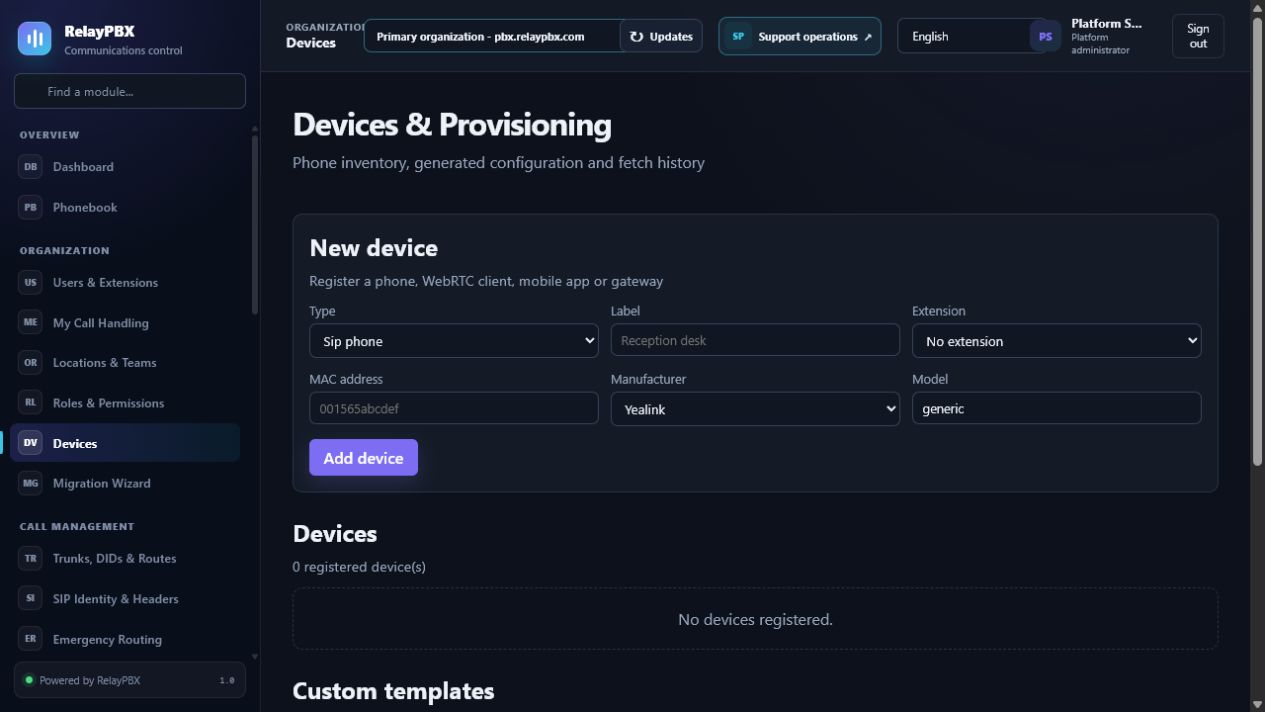
Zanim zaczniesz
Użyj administratora ograniczonego do tenanta, chyba że zadanie rzeczywiście wymaga dostępu do platformy. Utwórz plany, lokalizacje i role przed przypisaniem ich użytkownikom lub endpointom.
Przed zmianą masową albo zmianą routingu zapisz bieżącą wartość lub wyeksportuj objęte nią rekordy. Zapewnia to dokładny punkt porównania i ułatwia ocenę obsługiwanego cofnięcia transakcji.
Proces krok po kroku
Wykonuj kroki po kolei. Nie łącz pierwszej konfiguracji z niezwiązanym porządkowaniem danych; małe i jednoznaczne zmiany łatwiej sprawdzić i wycofać.
- Przypisz telefon do numeru wewnętrznego z danymi SIP.
- Wybierz producenta, dokładny model i transport.
- Wprowadź jednorazowy bezpieczny URL provisioningu w telefonie, DHCP albo zatwierdzonej usłudze producenta.
- Podejrzyj wygenerowany plik i potwierdź poprawne pobranie w historii provisioningu.
- Natychmiast zmień URL, jeżeli mógł zostać ujawniony.
Opis pól
Korzystaj z poniższego opisu podczas wypełniania formularza. Pola ukryte przez edycję, licencję modułu albo rolę są celowo niedostępne dla zalogowanego użytkownika.
- Producent i model
- Obsługiwany profil rodziny Yealink, Fanvil, Grandstream, Poly, Snom, Cisco MPP/SPA lub Htek albo własny szablon tenanta.
- Adres MAC
- Dwanaście znaków szesnastkowych wiążących plik z jednym endpointem.
- Transport
- UDP, TCP albo TLS umieszczony w profilu producenta.
- VLAN / kodeki / NTP / język
- Ustawienia urządzenia zastępujące wartości domyślne szablonu.
- Bezpieczny URL provisioningu
- Losowy 256-bitowy sekret startowy widoczny tylko po utworzeniu albo rotacji; przechowywany jest wyłącznie jego skrót.
- Podgląd
- Widok końcowego pliku producenta dostępny administratorowi tenanta przed pobraniem przez urządzenie.
- Historia provisioningu
- Czas, wynik, źródłowe IP i bezpieczny opis błędu ostatnich pobrań.
- Własny szablon
- Nadpisanie tenanta i modelu wykorzystujące udokumentowane, bezpiecznie escapowane zmienne.
Testy akceptacyjne
Zapisanie rekordu jest dopiero początkiem weryfikacji. Wykonaj wszystkie odpowiednie testy poniżej, a przy telefonii zachowaj identyfikator sesji, czas i wynik rozmowy.
- Przywróć telefon do ustawień fabrycznych i potwierdź pobranie tylko kanonicznego pliku HTTPS dla jego MAC.
- Sprawdź rejestrację, audio przychodzące i wychodzące, DTMF RFC 4733 oraz pocztę głosową.
- Zmień URL provisioningu i potwierdź, że poprzedni zwraca 404.
- Przed uznaniem urządzenia za certyfikowane zapisz model sprzętu i sprawdzoną wersję firmware.
Typowe błędy i bezpieczne odzyskiwanie
Jeżeli test się nie powiedzie, nie dodawaj kolejnych zmian. Przywróć poprzednią wartość albo użyj obsługiwanego cofnięcia transakcji, wygeneruj ponownie konfigurację PBX, a następnie powtórz najmniejszy nieudany test.
- URL provisioningu zawiera sekret startowy i nie może trafić do zgłoszeń, zrzutów ani zwykłego e-maila.
- Profil rodziny zapewnia zgodność rejestracji; certyfikacja modelu i firmware nadal wymaga testu fizycznego urządzenia.
- Nie rozpowszechniaj szablonów innych systemów PBX jako własnych szablonów RelayPBX.
Co dołączyć do zgłoszenia
Podaj tenant, moduł i nazwę obiektu, czas lokalny wraz ze strefą, wynik oczekiwany, wynik obserwowany oraz ostatni poprawny stan. Dla problemu z rozmową dołącz identyfikator logicznej sesji i zanonimizowaną diagnostykę tekstową SIP/SDP przed poproszeniem o PCAP.
Nigdy nie wklejaj do zgłoszenia haseł, kluczy prywatnych, nieprzetworzonego dokumentu licencji ani niezanonimizowanych mediów klienta. Gdy pomoc techniczna potrzebuje dodatkowych danych, użyj jednorazowej zgody diagnostycznej i chronionych załączników.