Przeznaczenie i lokalizacja
Ustawiaj skończoną retencję audytu i czatu, sprawdzaj pokrycie polityk i przygotuj zanonimizowany przegląd danych użytkownika.
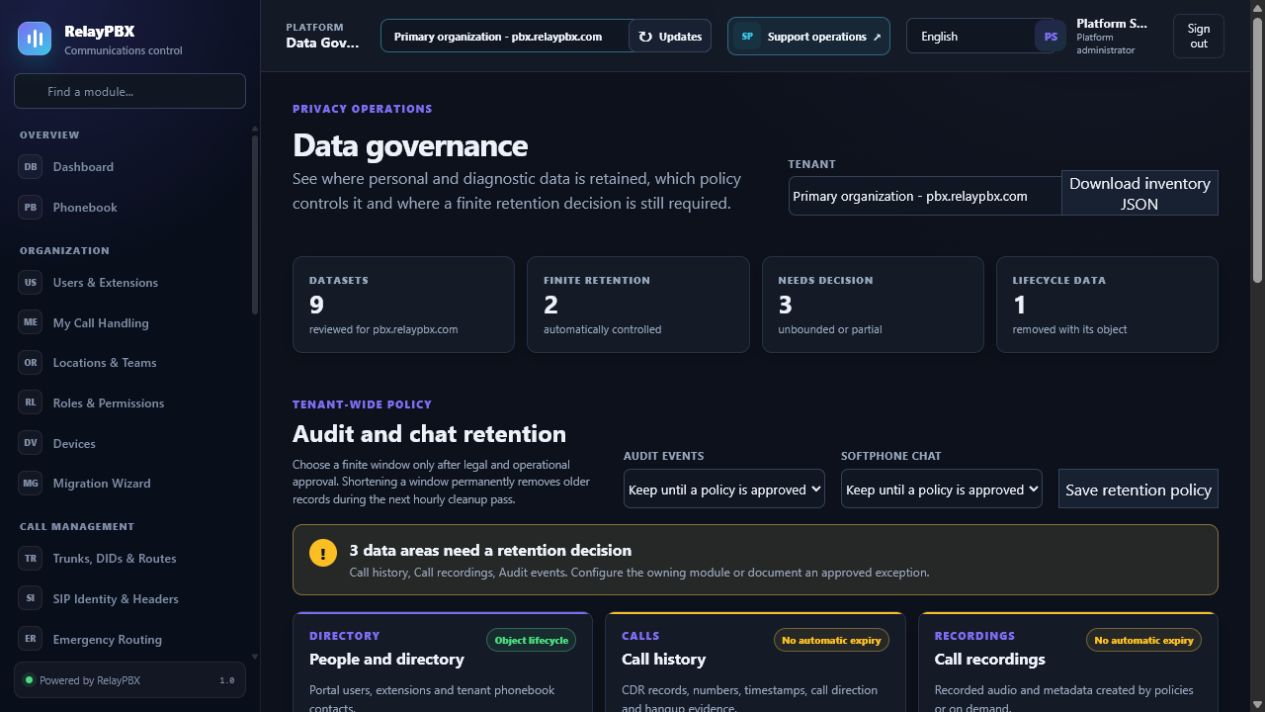
Otwórz Platforma → Zarządzanie danymi. Dostępne elementy sterujące zależą od aktywnej edycji, uprawnień modułu, roli i zakresu tenanta.
Zanim zaczniesz
Zmiany platformowe mogą wpłynąć na wszystkie tenanty. Potwierdź aktualną zweryfikowaną kopię zapasową, właściciela operacji i okno serwisowe, jeżeli działanie może zrestartować usługi lub zmienić uprawnienia licencji.
Przed zmianą masową albo zmianą routingu zapisz bieżącą wartość lub wyeksportuj objęte nią rekordy. Zapewnia to dokładny punkt porównania i ułatwia ocenę obsługiwanego cofnięcia transakcji.
Proces krok po kroku
Wykonuj kroki po kolei. Nie łącz pierwszej konfiguracji z niezwiązanym porządkowaniem danych; małe i jednoznaczne zmiany łatwiej sprawdzić i wycofać.
- Wybierz zakres tenanta i najpierw przejrzyj pozycje Wymaga decyzji.
- W Retencji audytu i czatu pozostaw brak limitu do czasu zatwierdzenia albo wybierz 30-3650 dni.
- Zapisz politykę i potwierdź zdarzenie policy_update przed następnym czyszczeniem godzinowym.
- Wyszukaj osobę według nazwy, e-maila albo numeru.
- Pobierz zanonimizowany spis z uprawnieniem OPERATIONS.MANAGE i dołącz wyłącznie do chronionej sprawy prywatności.
- Pobierz spis tenanta do okresowego przeglądu prywatności.
Opis pól
Korzystaj z poniższego opisu podczas wypełniania formularza. Pola ukryte przez edycję, licencję modułu albo rolę są celowo niedostępne dla zalogowanego użytkownika.
- Stan
- Zarządzany, częściowy, bez limitu, kontrolowany cyklem życia albo pusty.
- Rekordy
- Łączna liczba rekordów; dane plikowe raportowane bez wyliczania plików.
- Retencja
- Skończone okno, cykl życia obiektu albo jawny brak wygaśnięcia.
- Zdarzenia audytu
- Polityka 30-3650 dni w tenancie; pusta oznacza brak automatycznego usuwania.
- Czat softphone
- Polityka 30-3650 dni; czyszczenie usuwa treść wiadomości, nie tylko stan odczytania.
- Najstarszy / najnowszy
- Granice czasu identyfikujące nieoczekiwanie stare dane.
- Wyszukiwanie osoby
- Użytkownik portalu według nazwy, e-maila lub numeru.
- Spis osoby
- Audytowany JSON z profilem i zagregowanym zakresem danych, bez treści, plików i sekretów.
- Spis tenanta JSON
- Wersjonowany, zanonimizowany raport liczników, okien i luk bez treści klienta.
Testy akceptacyjne
Zapisanie rekordu jest dopiero początkiem weryfikacji. Wykonaj wszystkie odpowiednie testy poniżej, a przy telefonii zachowaj identyfikator sesji, czas i wynik rozmowy.
- Potwierdź, że administrator tenanta nie może wybrać, wyszukać ani eksportować innego tenanta.
- W izolowanym tenancie ustaw krótką politykę, postarz rekordy testowe i sprawdź usunięcie tylko danych starszych od granicy.
- Sprawdź, że zdarzenia retencji zawierają tylko liczniki, granicę i liczbę dni.
- Wyeksportuj spis osoby i potwierdź brak treści wiadomości, danych SIP, PIN-ów, ścieżek mediów oraz surowych CDR/SIP.
- Sprawdź w audycie eksport wraz z aktorem i identyfikatorem osoby.
Typowe błędy i bezpieczne odzyskiwanie
Jeżeli test się nie powiedzie, nie dodawaj kolejnych zmian. Przywróć poprzednią wartość albo użyj obsługiwanego cofnięcia transakcji, wygeneruj ponownie konfigurację PBX, a następnie powtórz najmniejszy nieudany test.
- Skrócenie okna trwale usunie starsze rekordy przy następnym czyszczeniu; najpierw sprawdź legal hold i backup.
- Spis osoby jest materiałem do triage, a nie kompletną odpowiedzią na formalne żądanie osoby.
- Nie omijaj weryfikacji tożsamości, zatwierdzeń, zgód na nagrywanie ani formalnego procesu usunięcia.
Co dołączyć do zgłoszenia
Podaj tenant, moduł i nazwę obiektu, czas lokalny wraz ze strefą, wynik oczekiwany, wynik obserwowany oraz ostatni poprawny stan. Dla problemu z rozmową dołącz identyfikator logicznej sesji i zanonimizowaną diagnostykę tekstową SIP/SDP przed poproszeniem o PCAP.
Nigdy nie wklejaj do zgłoszenia haseł, kluczy prywatnych, nieprzetworzonego dokumentu licencji ani niezanonimizowanych mediów klienta. Gdy pomoc techniczna potrzebuje dodatkowych danych, użyj jednorazowej zgody diagnostycznej i chronionych załączników.