Przeznaczenie i lokalizacja
Sprawdzaj stan usług, pojemność tenantów, aktywność rozmów i ostrzeżenia operacyjne.
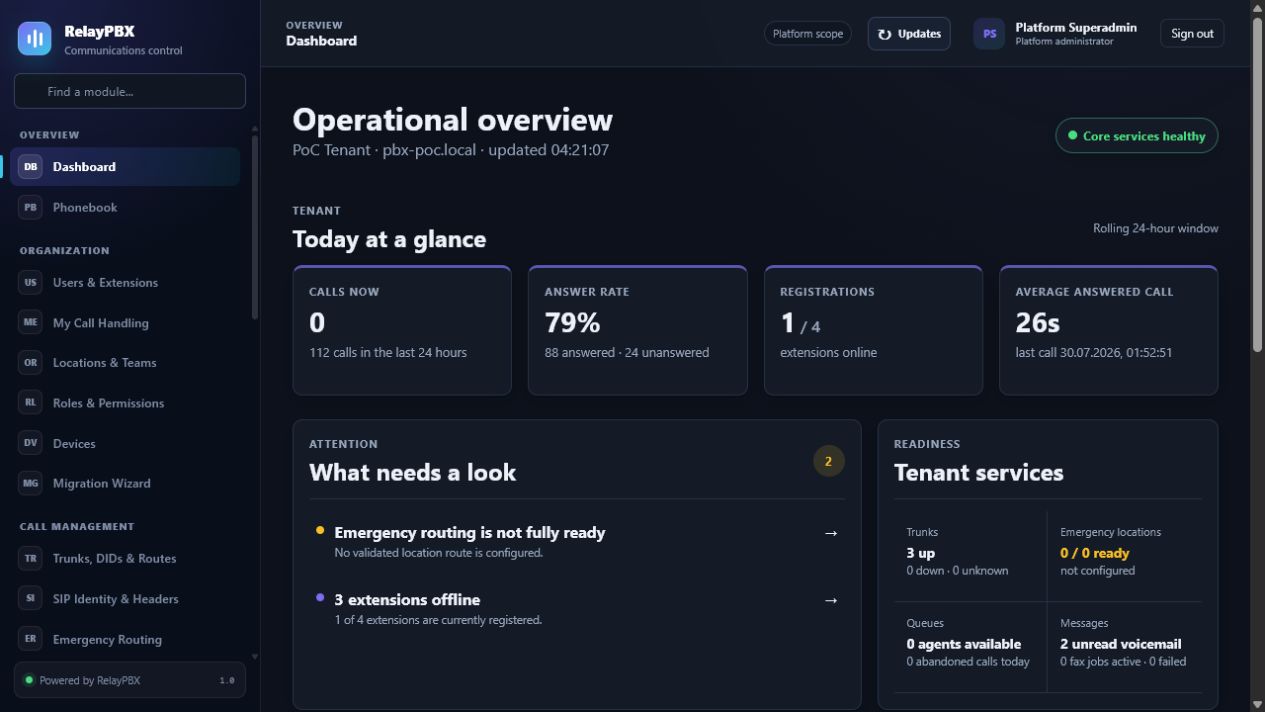
Otwórz Przegląd → Dashboard. Dostępne elementy sterujące zależą od aktywnej edycji, uprawnień modułu, roli i zakresu tenanta.
Zanim zaczniesz
Odczytanie tego ekranu nie wymaga zmiany konfiguracji. Przed interpretacją danych bieżących sprawdź wybrany tenant albo zakres platformy oraz strefę czasową.
Przed zmianą masową albo zmianą routingu zapisz bieżącą wartość lub wyeksportuj objęte nią rekordy. Zapewnia to dokładny punkt porównania i ułatwia ocenę obsługiwanego cofnięcia transakcji.
Proces krok po kroku
Wykonuj kroki po kolei. Nie łącz pierwszej konfiguracji z niezwiązanym porządkowaniem danych; małe i jednoznaczne zmiany łatwiej sprawdzić i wycofać.
- Potwierdź aktywny zakres i przedział czasu.
- Otwórz karty ostrzeżeń przed zmianą konfiguracji rozmów.
- Użyj skrótów modułów, aby przejść do rekordu źródłowego.
Opis pól
Korzystaj z poniższego opisu podczas wypełniania formularza. Pola ukryte przez edycję, licencję modułu albo rolę są celowo niedostępne dla zalogowanego użytkownika.
- Zakres
- Cała platforma dla superadmina albo wyłącznie tenant dla administratora delegowanego.
- Aktywne rozmowy
- Bieżące rozmowy połączone, dzwoniące i oczekujące w kolejkach.
- Stan rejestracji
- Zarejestrowane urządzenia w porównaniu z utworzonymi endpointami.
- Alerty
- Aktywne i potwierdzone warunki operacyjne wymagające przeglądu.
Testy akceptacyjne
Zapisanie rekordu jest dopiero początkiem weryfikacji. Wykonaj wszystkie odpowiednie testy poniżej, a przy telefonii zachowaj identyfikator sesji, czas i wynik rozmowy.
- Otwórz każde aktywne ostrzeżenie i sprawdź, czy prowadzi do odpowiedzialnego modułu.
- Porównaj liczniki rejestracji i aktywnych rozmów z jednym znanym endpointem i rozmową testową.
Typowe błędy i bezpieczne odzyskiwanie
Jeżeli test się nie powiedzie, nie dodawaj kolejnych zmian. Przywróć poprzednią wartość albo użyj obsługiwanego cofnięcia transakcji, wygeneruj ponownie konfigurację PBX, a następnie powtórz najmniejszy nieudany test.
- Poprawne podsumowanie stanu nie zastępuje rozmowy testowej po zmianie routingu, mediów albo operatora.
Co dołączyć do zgłoszenia
Podaj tenant, moduł i nazwę obiektu, czas lokalny wraz ze strefą, wynik oczekiwany, wynik obserwowany oraz ostatni poprawny stan. Dla problemu z rozmową dołącz identyfikator logicznej sesji i zanonimizowaną diagnostykę tekstową SIP/SDP przed poproszeniem o PCAP.
Nigdy nie wklejaj do zgłoszenia haseł, kluczy prywatnych, nieprzetworzonego dokumentu licencji ani niezanonimizowanych mediów klienta. Gdy pomoc techniczna potrzebuje dodatkowych danych, użyj jednorazowej zgody diagnostycznej i chronionych załączników.