Przeznaczenie i lokalizacja
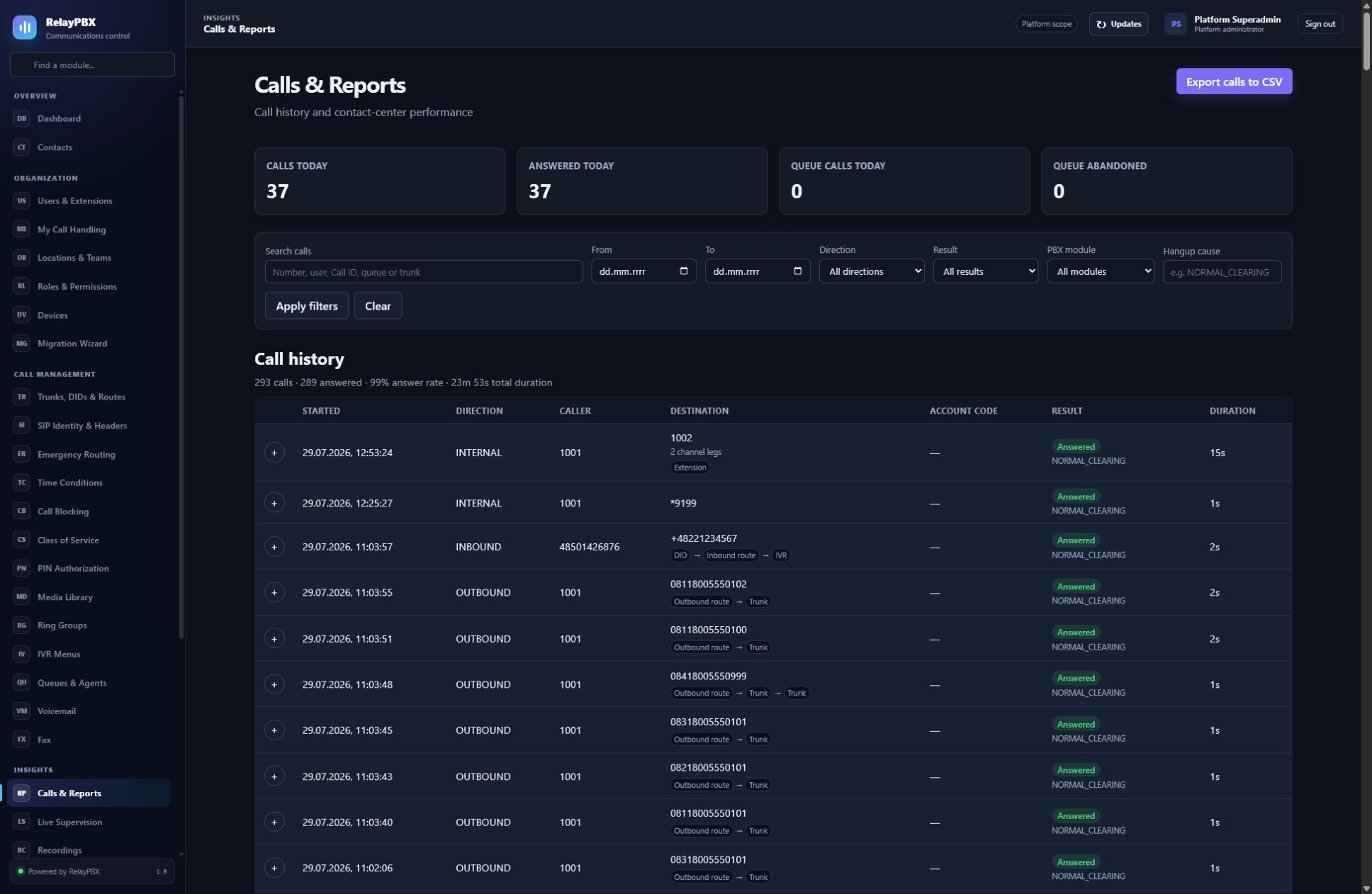
Wyszukuj logiczne sesje rozmów, rozwijaj przebieg endpointów i pobieraj diagnostykę sygnalizacji.
Otwórz Analiza → Rozmowy i raporty. Dostępne elementy sterujące zależą od aktywnej edycji, uprawnień modułu, roli i zakresu tenanta.
Zanim zaczniesz
Zacznij od najwęższego zakresu tenanta, uczestnika i czasu. Dane rozmów mogą zawierać dane osobowe, dlatego dostęp musi odpowiadać przypisanej roli i polityce retencji.
Przed zmianą masową albo zmianą routingu zapisz bieżącą wartość lub wyeksportuj objęte nią rekordy. Zapewnia to dokładny punkt porównania i ułatwia ocenę obsługiwanego cofnięcia transakcji.
Proces krok po kroku
Wykonuj kroki po kolei. Nie łącz pierwszej konfiguracji z niezwiązanym porządkowaniem danych; małe i jednoznaczne zmiany łatwiej sprawdzić i wycofać.
- Filtruj według daty i dokładnego czasu, numeru, kierunku albo wyniku.
- Rozwiń logiczną rozmowę przed analizą poszczególnych kanałów.
- Prześledź przebieg między modułami.
- Pobierz transkrypcję albo licencjonowany PCAP tylko wtedy, gdy jest potrzebny.
Opis pól
Korzystaj z poniższego opisu podczas wypełniania formularza. Pola ukryte przez edycję, licencję modułu albo rolę są celowo niedostępne dla zalogowanego użytkownika.
- Zakres czasu
- Włączny zakres lokalnej daty i godziny z minutami.
- Logiczna rozmowa
- Jedna rozmowa grupująca i deduplikująca wszystkie powiązane kanały.
- Przebieg
- Typowana ścieżka przez DID, IVR, warunek, grupę, kolejkę, numer, pocztę lub przekierowanie.
- Transkrypcja SIP/SDP
- Zwinięta diagnostyka tekstowa z zamaskowanymi wartościami wrażliwymi.
- PCAP
- Opcjonalnie przechwycona sygnalizacja i media objęte polityką retencji.
Testy akceptacyjne
Zapisanie rekordu jest dopiero początkiem weryfikacji. Wykonaj wszystkie odpowiednie testy poniżej, a przy telefonii zachowaj identyfikator sesji, czas i wynik rozmowy.
- Znajdź znaną rozmowę według dokładnego czasu i uczestnika i potwierdź, że występuje jako jedna logiczna rozmowa.
- Porównaj przebieg wizualny ze skonfigurowanymi celami i końcową przyczyną rozłączenia.
- Pobierz zanonimizowaną diagnostykę tekstową przed żądaniem przechwyconych pakietów.
Typowe błędy i bezpieczne odzyskiwanie
Jeżeli test się nie powiedzie, nie dodawaj kolejnych zmian. Przywróć poprzednią wartość albo użyj obsługiwanego cofnięcia transakcji, wygeneruj ponownie konfigurację PBX, a następnie powtórz najmniejszy nieudany test.
- PCAP może zawierać numery, nagłówki związane z uwierzytelnianiem i możliwe do odtworzenia nieszyfrowane audio; ogranicz dostęp i czas przechowywania.
- Logiczna rozmowa jest rekordem głównym; poszczególne kanały są szczegółem implementacji.
Co dołączyć do zgłoszenia
Podaj tenant, moduł i nazwę obiektu, czas lokalny wraz ze strefą, wynik oczekiwany, wynik obserwowany oraz ostatni poprawny stan. Dla problemu z rozmową dołącz identyfikator logicznej sesji i zanonimizowaną diagnostykę tekstową SIP/SDP przed poproszeniem o PCAP.
Nigdy nie wklejaj do zgłoszenia haseł, kluczy prywatnych, nieprzetworzonego dokumentu licencji ani niezanonimizowanych mediów klienta. Gdy pomoc techniczna potrzebuje dodatkowych danych, użyj jednorazowej zgody diagnostycznej i chronionych załączników.